30 cm safe distance
Fixed at 30 cm on the free plan. Premium lets you set anything from 20 to 50 cm.
JagaMata uses the front camera to estimate face distance. When your child gets too close, the screen dims and touch is blocked until they move back to a safe distance. Everything is processed on the phone, and the app has no internet access at all.
A child absorbed in a video or game drifts closer to the screen without noticing, and a parent's reminder works for a few minutes at best. JagaMata doesn't just warn: it stops giving a usable screen until the distance is safe again. Children learn on their own, without the argument.

Allow camera access and display over other apps, then set a PIN so only a parent can change the settings.

JagaMata works on top of YouTube, games or any other app. The front camera estimates face distance continuously, right on the phone.

When a face stays closer than the safe distance (30 cm by default), the screen dims and touch is blocked. Move back a little, and the screen clears as soon as a safe distance is detected.
Every feature answers two questions parents ask: can my child get around it, and where does the data go?
Fixed at 30 cm on the free plan. Premium lets you set anything from 20 to 50 cm.

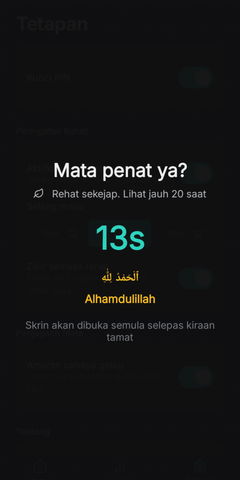
After every 20 minutes of continuous use, a 20-second break screen asks your child to look far away. There is no skip button.

See how often your child got too close each day, and for how long. It all stays on the phone.

Stopping monitoring, lowering the distance or switching profiles all need a 4-digit PIN. Your child can't turn it off on their own.

The app does not request Android's internet permission, so it cannot send anything off the phone.

Separate calibration for every child, because a 4-year-old's face and a 10-year-old's face are not the same size.
JagaMata uses Google's ML Kit face detector, bundled inside the app. Each camera frame is analysed in memory and then discarded. No photos, no face templates, no uploads.
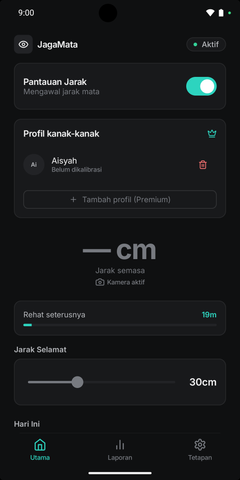
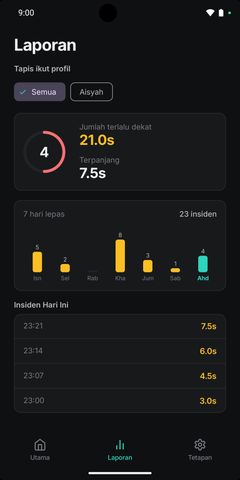
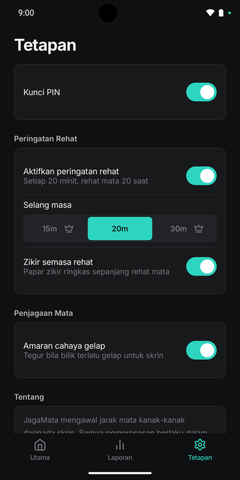
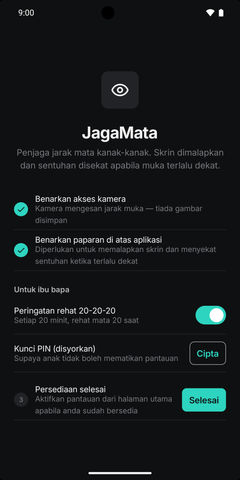
Core protection is free, with no ads and no time limit. Premium is for families who want to fine-tune every detail.
RM29.90 / per year · ≈ RM2.49 a month
Final prices are shown by Google Play and may vary by country. Subscriptions are managed in, and can be cancelled at any time from, Google Play.
JagaMata guides for parents: how the app estimates your child's face distance and how to get the best results from it.
Can't find your answer? Email us directly.
hello@sasateguh.comNo. Camera frames are analysed in the phone's memory and discarded immediately. No photo, video or face template is stored, and the app has no internet permission to send one anywhere.
Not without the PIN. With the parent PIN enabled, stopping monitoring, lowering the safe distance or switching profiles all require it. The break screen has no skip button either.
Yes. JagaMata runs as a foreground service and shows its reminder over other apps, using Android's "display over other apps" permission.
JagaMata estimates distance from the size of the face in the camera frame. It is an estimate, not a medical measurement. For better results, calibrate your child's profile at 30 cm and 50 cm, since every child's face is a different size.
The camera stops and the break countdown pauses. Monitoring resumes when the screen comes back on. After the phone restarts, JagaMata shows a notification so you can resume monitoring with one tap.
Android 8.0 or newer with a front camera. The app is in Bahasa Melayu and English. On Android 13 or newer you can pick the app's language in its Settings, separately from the phone.
No. JagaMata helps build better screen-distance habits, but it does not diagnose or treat any eye condition. See an optometrist for your child's eye check-ups.
In Google Play: tap your profile icon, choose Payments & subscriptions, then Subscriptions, select JagaMata and tap Cancel subscription.
Install JagaMata, set a PIN, and let the screen do the reminding. You don't have to anymore.
Coming soon to Google Play In review for release